
SISCO 700W 2-in-1 soldering station combines a high-power hot-air rework gun with a precision soldering iron for versatile PCB and SMD work. It heats rapidly, maintains stable temperatures, and offers adjustable airflow for delicate components. Perfect for technicians, this compact rework station also includes automatic sleep to save energy.
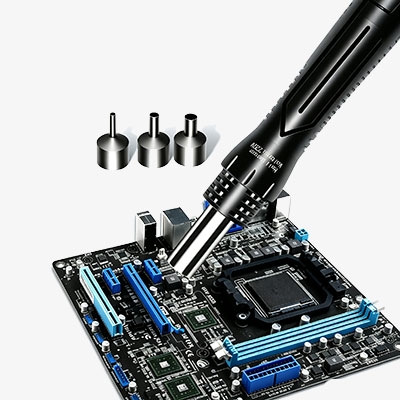
Intelligent Temperature Control & Preset Memory
- High-visibility digital display shows real-time temperature with selectable °C/°F readout, allowing users in any region to monitor heat at a glance.
- One-touch calibration quickly corrects temperature offsets using an external thermometer, ensuring the set value matches the actual tip or air temperature for accurate results.
- Three programmable memory channels store your most-used temperatures (e.g., 350°C, 400°C, 450°C) and recall them instantly via dedicated buttons, streamlining repetitive tasks.
- Automatic last-setting memory retains the last used temperature after shutdown, so you don’t have to reset parameters each time you power on.
- Fast-response PID-like control maintains stable heat with minimal fluctuation, even during prolonged desoldering or heavy SMD soldering, reducing cold joints and component stress.
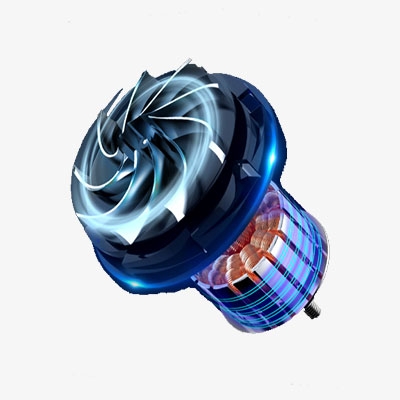
Energy-Saving Standby & ESD Protection
- Intelligent auto-sleep stops heating instantly when the handpiece is returned to its holder, and the fan runs briefly to cool the element, cutting idle power consumption and extending heater life.
- Independent tool switches let you power on the hot air gun or soldering iron separately, so you never waste energy on an unused function, and each tool operates only when needed.
- Built-in anti-static transformer guards against electrostatic discharge, protecting delicate microchips and PCB components during fine SMD rework and BGA repairs.
- Overheat safeguard uses internal thermal monitoring to prevent excessive temperature buildup, automatically reducing power if abnormal heating is detected, ensuring safe operation.
- Fan-assisted cool-down continues running after sleep activation until the heater drops below a safe threshold, preventing thermal stress and prolonging the ceramic core’s lifespan.
Applications
SISCO 2-in-1 soldering station is perfect for mobile phone repairs, laptop motherboard rework, and consumer electronics maintenance. It handles SMD component replacement, BGA chip desoldering, and through-hole soldering with ease. Hobbyists and professionals benefit from its precise temperature control for delicate PCBs. Use it in repair shops, maker spaces, or educational labs for daily soldering, desoldering, and hot air rework projects on a wide range of electronic devices.

Automotive Repair
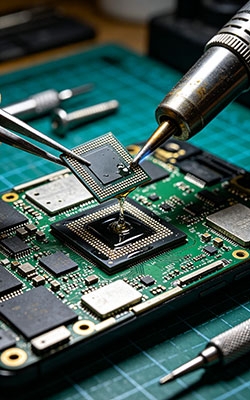
BGA Chip Desoldering
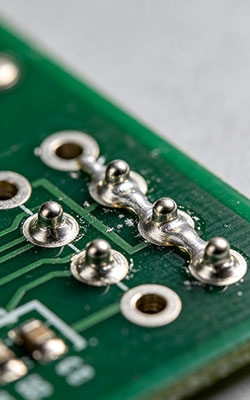
Hole Soldering
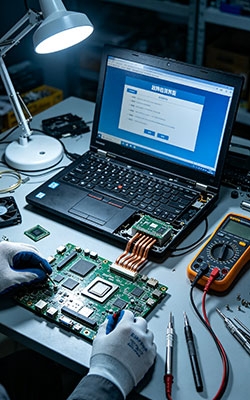
Laptop Repair
| Model | SISCO-SS-8586 |
| Rated Power | 700W |
| Soldering Iron Power | 60W |
| Input Voltage | 110V/220V |
| Hot Air Temperature Range | 100°C – 500°C |
| Soldering Iron Temperature Range | 180°C – 500°C |
| Display Type | LED Digital Display |
| Heating Element | Ceramic Heating Core (plug-in type for iron) |
| Airflow Type | Brushless Fan with Swirl-Type Air Outlet |
| Temperature Control | °C / °F Switchable, Calibratable |
| Memory Function | Last-setting memory + 3 programmable preset channels |
| Standby / Sleep Mode | Automatic sleep when the handpiece is placed on the stand |
| Independent Power Switches | Yes (hot air and iron controlled separately) |
| Anti-Static Protection | Built-in ESD-safe transformer |
| Net Weight | Approx. 1.7 kg |
| Unit Dimensions (L×W×H) | 15 cm × 9 cm × 13 cm |
| Included Nozzle Diameters | 4 mm / 7 mm / 9 mm |
Q1: How does automatic sleep protection work on this soldering station?
A1: When the handpiece is placed back on the original stand, the display shows a flashing "SLP" indicator. The heating element stops immediately, and the fan speed increases to maximum to cool the system. Once the internal temperature drops below approximately 80°C (176°F), the fan stops automatically, and the display stops flashing. Simply pick up the handpiece to wake the 2-in-1 hot air and soldering station and resume heating to your preset temperature.
Q2: How do I calibrate the temperature on this digital soldering station?
A2: First, switch the rework station to the desired working mode (soldering iron or hot air) by pressing the SET key until the corresponding indicator lights up. For the soldering iron, press SET once to enter calibration mode; for hot air, press SET twice. The display will show "00". Set your working temperature to 350°C, wait about 3 minutes, then measure the actual temperature using an external thermometer. If it reads 340°C, add +10; if it reads 360°C, subtract -10. The temperature-controlled soldering system will save the correction automatically after 5 seconds of no operation.
Q3: Can I use both the hot air gun and soldering iron at the same time?
A3: Yes, both tools can be operated simultaneously on this 2-in-1 desoldering station since they have independent power switches. This feature is especially useful when preheating a PCB with hot air while performing fine SMD soldering with the iron. Each tool maintains its own temperature setting and can be turned on or off separately, giving you full flexibility during complex BGA rework and electronic repairs without needing two separate workstations.
Tips: How to get the best performance from your 2-in-1 hot air soldering station?
- Allow this digital soldering station to warm up for 2 to 3 minutes before use. The ceramic heating core needs time to stabilize, especially when switching between soldering iron and hot air functions.
- When performing BGA reballing or chip removal on this SMD rework station, always select the appropriate nozzle size for your component. Wider nozzles suit larger ICs, while smaller nozzles provide focused airflow for tiny SMD parts.
- The automatic sleep feature on this rework station stops heating instantly when the handpiece is placed on the stand. This extends the ceramic heater's lifespan and reduces power consumption during short breaks.
- Keep the soldering iron tip clean and properly tinned after each use. Oxidation or old solder residue reduces heat transfer, affecting soldering quality on this temperature-controlled soldering station.
Thank you for buying industrial test and measurement equipment on SISCO.com, all products sold by SISCO and the partner cover a 12 months warranty, effective from the date of receiving the products.
What is covered?
SISCO is responsible for providing free spare parts, and free technical support to assist the customer to repair the defective products until the problem is solved.
What is not covered?
- Product purchased from anyone other than a SISCO store or a SISCO authorized reseller.
- Expendable parts.
- Routine cleaning or normal cosmetic and mechanical wear.
- Damage from misuse, abuse or neglect.
- Damage from use of parts other than SISCO approved.
- Damage from use outside the product’s usage or storage parameters.
- Damage from use of parts not sold by SISCO.
- Damage from modification or incorporation into other products.
- Damage from repair or replacement of warranted parts by a service provider other than a SISCO authorized service provider.
- Damage caused by the application environment not meeting the product usage requirements and the failure to perform preventive maintenance.

Shop on sisco.com for all of your industrial test and measurement equipment & accessories including portable detectors, meters, testers, scales, etc.


